Importing Your Guest List from Minted
Moving from a Minted wedding website? Download your guest list and upload it to Wedping as is. We convert it for you, keeping households and RSVPs.
Step 1: Download Your List from Minted
- Open your wedding website's Guest List on Minted.
- Select all your guests.
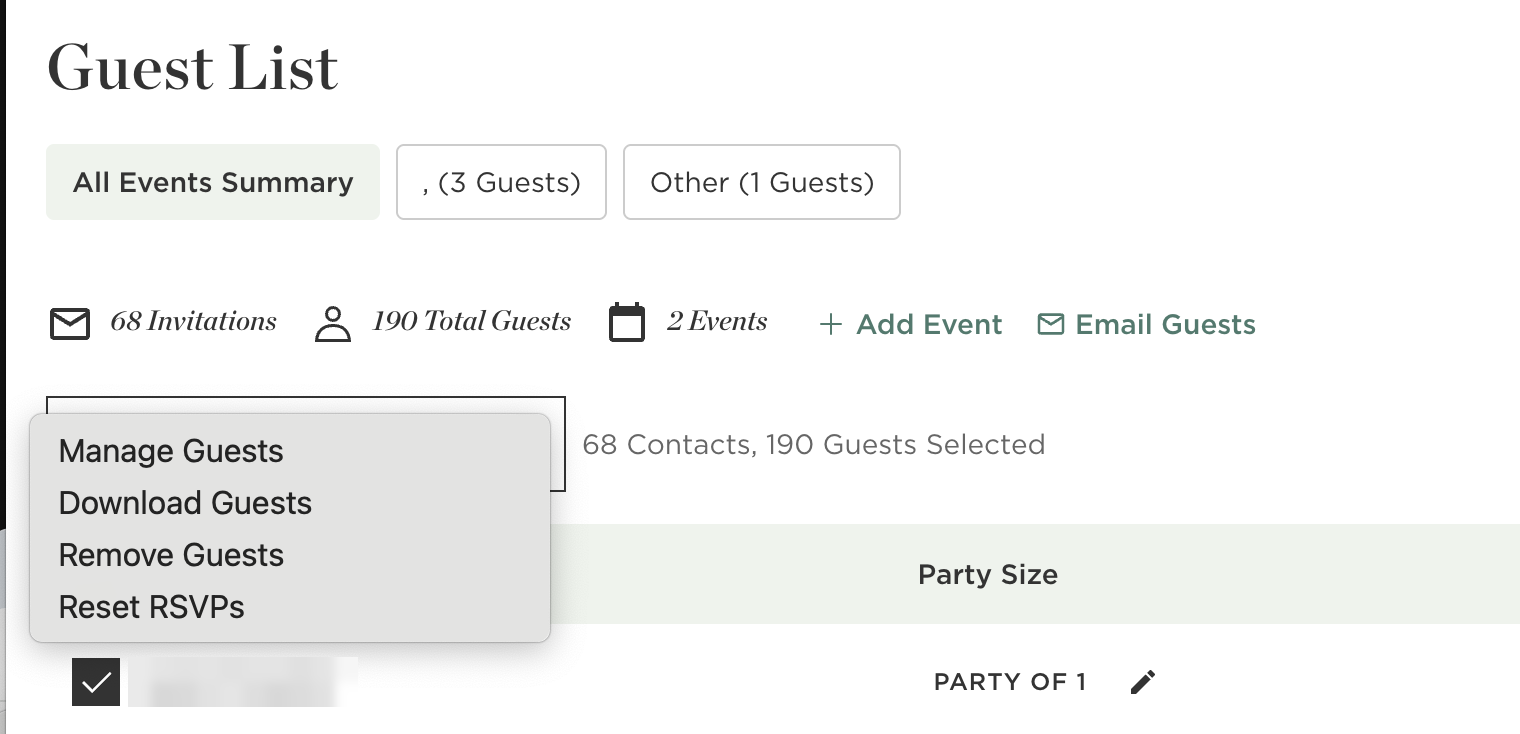
- Open the actions menu and click Download Guests.
- Save the file. Don't edit it first.
Step 2: Upload to Wedping
- Open your event's Guest List page and click Import guests.
- Click Upload File and choose the file you downloaded.
- When we ask where your list is from, choose Minted.
- Match each Minted event to an event in Wedping, or let us create it.
- Review your guests, then click Add to list.
What Carries Over
Names, emails and phone numbers
Each person on your Minted list becomes a guest in Wedping, with their own contact details.
Households
Guests who share a Name on Envelope, like "Michelle and Art Alvarez", are linked so one person can RSVP for everyone.
RSVPs for each event
Attending and Not Attending carry over as RSVPs. Invited means invited without a reply yet. Not Invited means the guest isn't invited to that event.
Good to Know
Download every guest
Minted only downloads the guests you've selected. Select all of them before you click Download Guests.
Always check the preview
The conversion uses AI. It works well, but it isn't perfect. Nothing is added until you confirm, and you can uncheck anyone first.
Importing again is safe
Guests that match someone already on your list, by phone, email, or name, are updated instead of added twice.